Master complex workflows. Predict every cost.
Scale your efficiency and master turn-around times. Predict costs, quote accurately and eliminate process waste through intuitive simulation—no programming or complex math required.

Run simulations before execution
Preview cycle times and outcomes before a single task is started.

See bottlenecks instantly
Control patient wait times and optimize utilization of diagnostics equipment.

Align teams with reliable forecasts
Turn uncertain estimates into data-backed staffing plans.
The complete foundation for process simulations
Everything you need to simulate a complex workflow with extensive metrics collection, from cost per processed item, work in process levels over time, turn around time, resources utilization and much more.
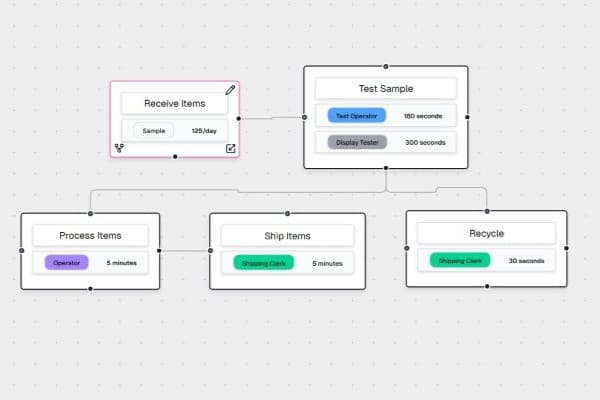
Process Design
Model your real workflow with branching paths, resource assignments, and time-based input patterns in one visual flow.
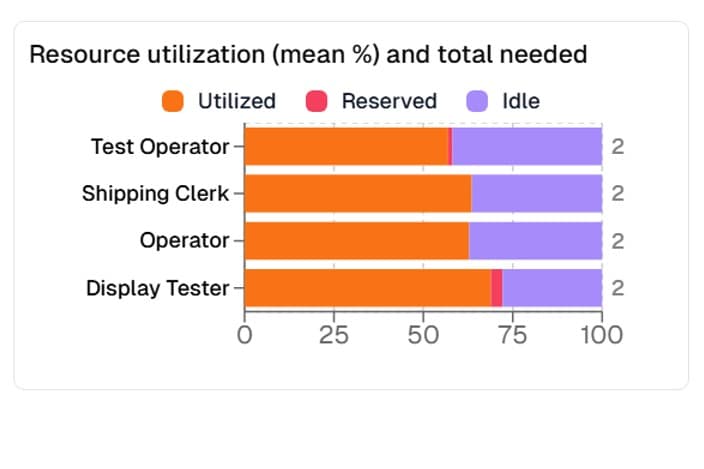
Resource Utilization
See how each resource is allocated across active, reserved, and idle time so staffing decisions are based on measured load.
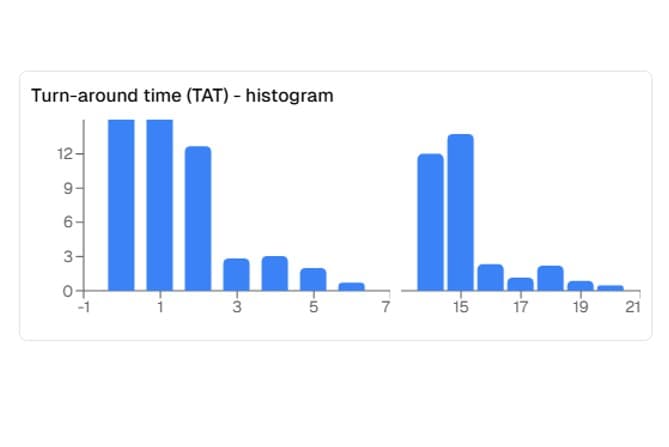
Turnaround Time Insights
Track turnaround time distributions across scenarios to understand typical completion windows and where delays are introduced.
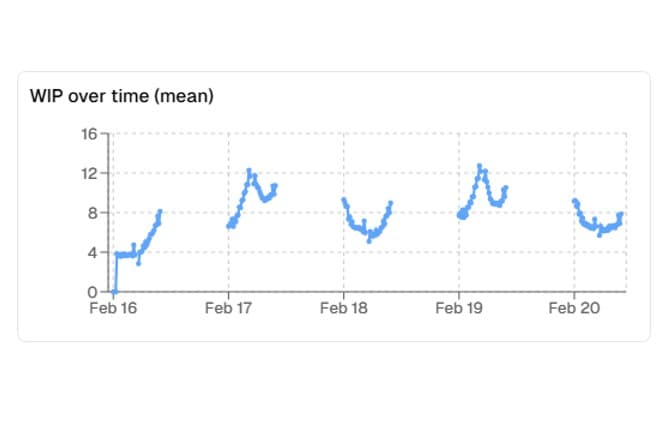
Work-In-Progress Trends
Visualize WIP over time to spot queue build-up, timing bottlenecks, and periods where throughput starts to drift.
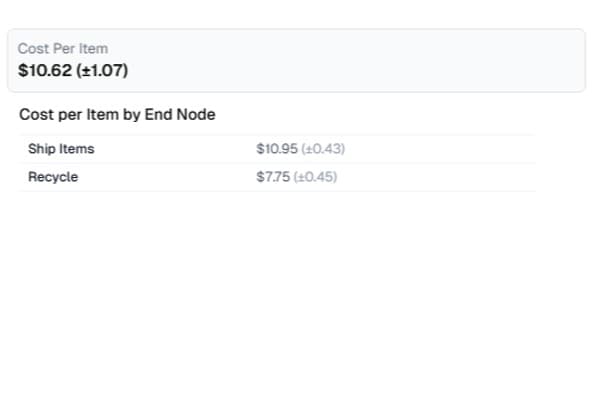
Cost Forecasts by Scenario
Estimate labor and equipment cost outcomes by simulation run, including per-item and per-output-node views for clearer tradeoffs.
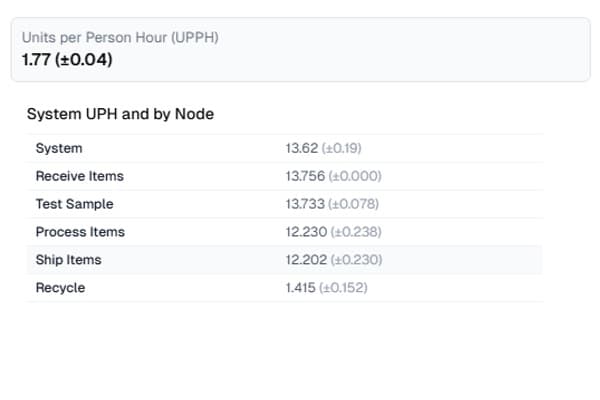
Units Per Hour and Per Person Hour
Measure units per hour and units per person-hour to benchmark productivity and evaluate how process changes affect efficiency.
Built for detailed simulation workflows
- Export simulation outputs to Excel for offline review, reporting, and stakeholder sharing.
- Create multiple schedules to represent shift patterns, delivery windows, arrival profiles, and other time-based inputs.
- Configure people and equipment with cost rates, PFD, planned schedules, and unplanned downtime assumptions.
- Restrict included process paths to avoid invalid routing, such as circular flow definitions.
- Set core simulation controls, including run window, input-rate variability, and experiment count.
Pricing to fit your business needs.
Free
$0.00/mo
Get started with basic features
Up to 7 flow activities
Basic simulations
Pro
$49.00/mo
For growing teams
2-day free trial
Unlimited flow activities
Advanced simulations
Team Pro
$69.00/mo
For growing teams
2-day free trial
Unlimited flow activities
Advanced simulations
Share with team members
Additional licenses 40% off
Questions & Answers
Latest articles
Insights, updates and stories from our team.
The Simulation Trap: Why Generative AI Isn’t Ready to Engineer Your Operations
AI is great for brainstorming, but it fails at complex math. See why general logic misses hidden bottlenecks.

The Price of Complexity: Master the Art of Repair Service Quoting
Stop gambling on service margins. Use simulation to map every repair path, predict labor costs, and avoid hidden TAT penalties.
Unlocking Efficiency: Why Discrete Event Simulation is Your Workflow’s Secret Weapon
Ready to get started?
Create your free account today. No credit card required.